![Smoothx_Logo_FC_White_RGB.png]](https://support.smoothx.com/hs-fs/hubfs/Smoothx_Logo_FC_White_RGB.png?height=20&name=Smoothx_Logo_FC_White_RGB.png)
When enabled, ProScan+ allows users to create new vendors which sync directly in to Procore.
When creating a new vendors, be sure to confirm the vendor does not already exist in Procore. Duplication is a common issue if not checked.
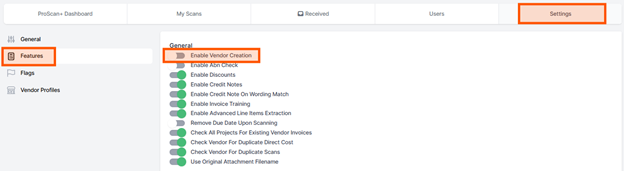
Enable Vendor Creation in Settings (Admin User Only)
Before creating new vendors, ensure the feature is enabled in your ProScan+ team settings.
- Open Smoothx Tools and select ProScan+.
- Navigate to the Settings menu and click the Features tab.
- Under the General section, toggle on Enable Vendor Creation.
- Click Save.
Create a New Vendor
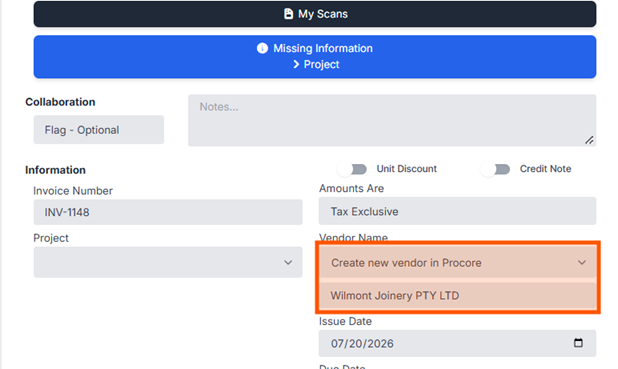
Once the setting is active, follow these steps to add a vendor:
- Open your Scan
- Select Create new vendor in Procore
- Type the new vendor name
- Complete all required information and publish the scan