![Smoothx_Logo_FC_White_RGB.png]](https://support.smoothx.com/hs-fs/hubfs/Smoothx_Logo_FC_White_RGB.png?height=20&name=Smoothx_Logo_FC_White_RGB.png)
The On Hold status can be used to identify scans that might require follow-up or action before publishing to Procore.
You can quickly find and locate On Hold scans in the My Scans results.
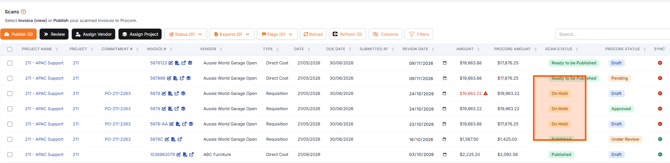
The On Hold status is applied under the Scan Status column in My Scans.
Applying the On Hold Status
- Open Smoothx Tools and select ProScan+
- Navigate to My Scans
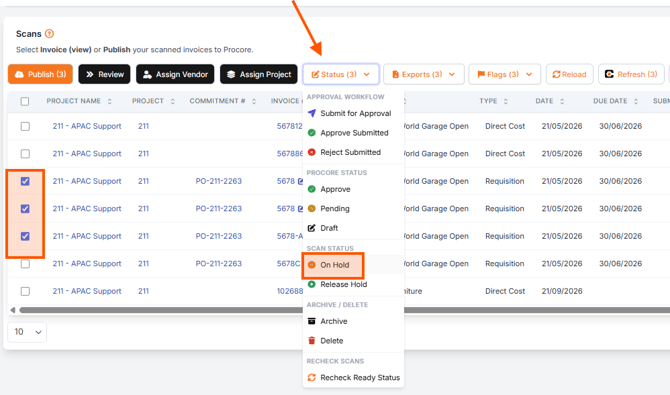
- Tick the selected scan(s)
- Select the Status menu
-
Click On Hold - Scan Status
Removing the On Hold Status
- Open Smoothx Tools and select ProScan+
- Navigate to My Scans
- Tick the selected scan(s)
- Select the Status menu
-
Click Release Hold - Scan Status

How to Filter My Scans for On Hold status
Status Shortcut
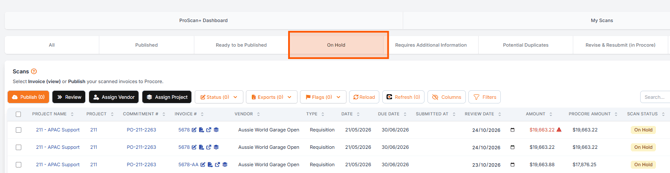
You can locate all On Hold scans using the status shortcut located above the scan results.
My Scans Filters
- Open Smoothx Tools and select ProScan+
- Navigate to My Scans
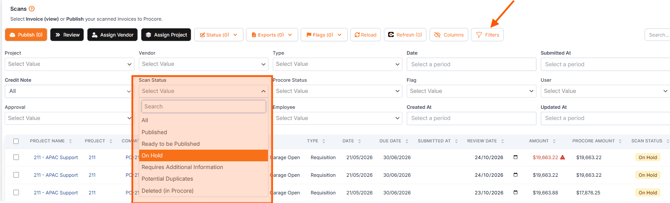
- Click the Filters menu
- Select the Scan Status dropdown
- Select On Hold