![Smoothx_Logo_FC_White_RGB.png]](https://support.smoothx.com/hs-fs/hubfs/Smoothx_Logo_FC_White_RGB.png?height=20&name=Smoothx_Logo_FC_White_RGB.png)
Advanced Line Items Extraction allows Proscan+ to capture the detailed description of each line item individually.
When disabled, all line items are merged into a single entry with the total amount.
This applies to all Progress Claims and Direct Costs.
Setting is ON by default.
Setting On: Proscan captures the detailed description of each line item individually.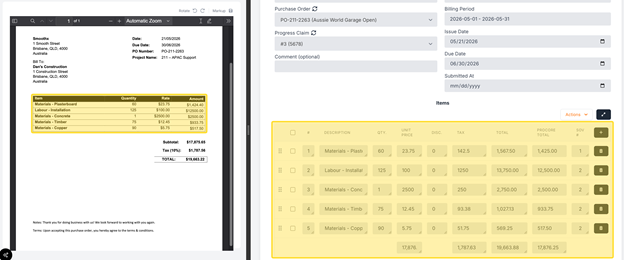
Setting Off: Proscan merges all line items into a single entry.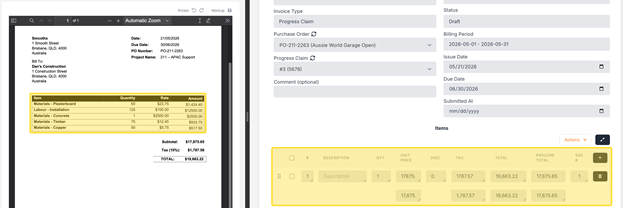
How to Enable Advanced Line Item Extraction (Admin User Only)
- Open Smoothx Tools and select ProScan+
- Navigate to the Settings menu and click the Features tab.
- Under the General section, toggle on Enable Advanced Line Items Extraction.

- Click Save.