![Smoothx_Logo_FC_White_RGB.png]](https://support.smoothx.com/hs-fs/hubfs/Smoothx_Logo_FC_White_RGB.png?height=20&name=Smoothx_Logo_FC_White_RGB.png)
You can export your search results and filtered scans from the My Scans or the Archive Folder in ProScan+.
Only the selected results in your active search filters will be included in the export file.
How to Export My Scan Search Results
Once you have filtered or searched for the specific records you want to review, you can download them directly to your loacal PC as a spreadsheet or zip file containing PDF attachments.
- Open Smoothx Tools and select ProScan+.
- Navigate to My Scans or Archive Folder
- Apply any required column filters or search queries to refine your results.
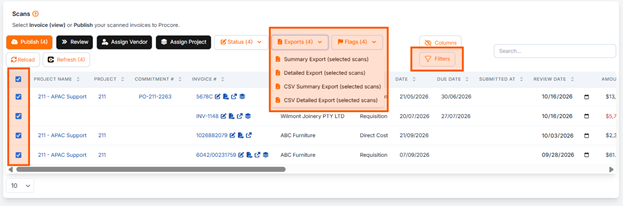
- Check the tickbox (or select all) for the data to be exported
- Click the Export button
- Selet from:
- Summary Export - Zip File containing CSV (One row per selected scan) and PDF attachments.
- Detailed Export - Zip File containing CSV (Muliple rows per selected scan, includig line item breakdown) and PDF attachments.
- CSV Summary Export - One row per selected scan.
- CSV Detailed Export - Muliple rows per selected scan, includig line item breakdown