![Smoothx_Logo_FC_White_RGB.png]](https://support.smoothx.com/hs-fs/hubfs/Smoothx_Logo_FC_White_RGB.png?height=20&name=Smoothx_Logo_FC_White_RGB.png)
The Commitment Schedule of Values Editing Setting allows you to make real-time adjustments to your Procore Commitment SOV.
You can edit Unit Price or Quantity values on Quantity-based commitments, and the Total Amount on Amount-based commitments.
When enabled, any ProScan+ user can make adjustments to the SOV values.
Variations MUST be updated in Procore.
Please consult with the Smoothx Support team.
Enable Commitment Schedule Of Values Editing Setting
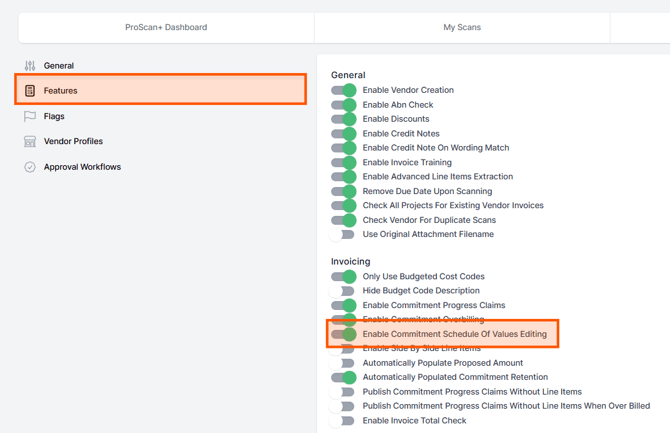
- Open Smoothx Tools and select ProScan+
- Navigate to the Settings menu
- Under the Features menu, Invoicing section, toggle on Enable Commitment Schedule Of Values Editing
How to update Procore Schedule of Values
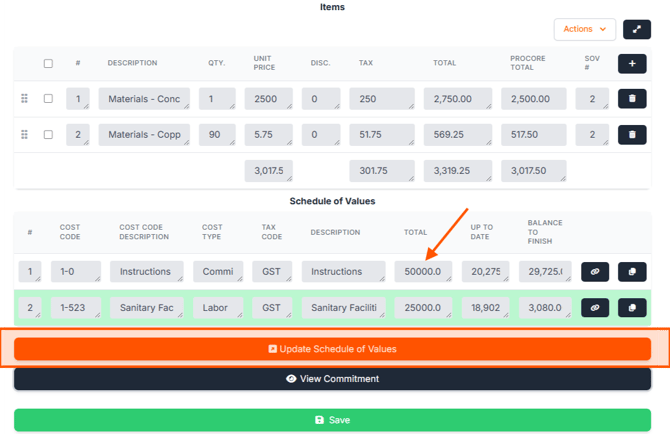
- Open the selected scan
- Under the Schedule of Values edit:
- Unit Cost or Quantity (Quantity-based commitments)
- Total Amount (Amount-based commitments)
- Click Update Schedule of Values
Verification
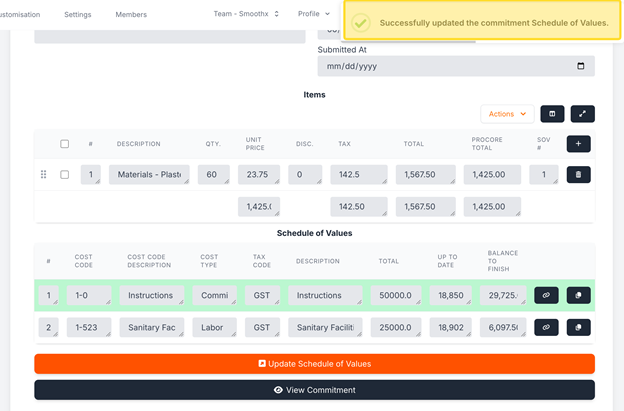
Make sure that a success confirmation appears and that the table updates without any validation errors.
Click View Commitment to open the commitment in Procore.