![Smoothx_Logo_FC_White_RGB.png]](https://support.smoothx.com/hs-fs/hubfs/Smoothx_Logo_FC_White_RGB.png?height=20&name=Smoothx_Logo_FC_White_RGB.png)
The Notification Bell allows you to view actions required, e.g. ProScan Workflow Approval, along with setting you email notifications.
Access the Notification Bell- Log in to your Smoothx Integration
- Select the Notification Bell
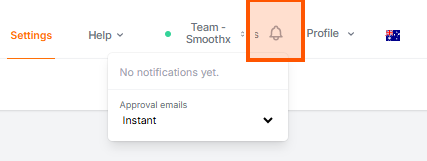
Approval Emails
Email Notification settings apply to the specific user account.
There are no separate email notification just for Smoothx Tool admins.
-
- Instant: Every approval email as it happens (default option).
- Only what needs me: Emailed straight away only when action is required: An invoice awaits their approval (including reminders and overdue notices for Administrators), or one of a users assigned invoices comes back for updating. Nothing else is emailed.
- Daily digest: One email a day with what's waiting on them and the day's updates.
- Off: No approval emails. The bell still shows every notice.