![Smoothx_Logo_FC_White_RGB.png]](https://support.smoothx.com/hs-fs/hubfs/Smoothx_Logo_FC_White_RGB.png?height=20&name=Smoothx_Logo_FC_White_RGB.png)
Archive Folder
The Archive Folder stores invoices that do not require publishing to Procore, along with invoices that have been published to Procore and have the Approved status applied.
ProScan+ Settings allow you to control automation rules around when published invoices are moved to the Archive Folder.
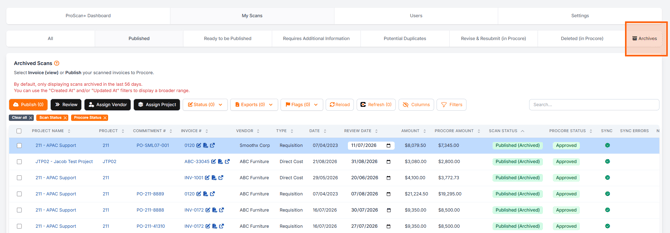
Archive Settings
See: ProScan+ Settings - Features
Moving Invoices to the Archive Folder
Invoices can be manually moved from My Scans to the Archive Folder, e.g. duplicate invoices.
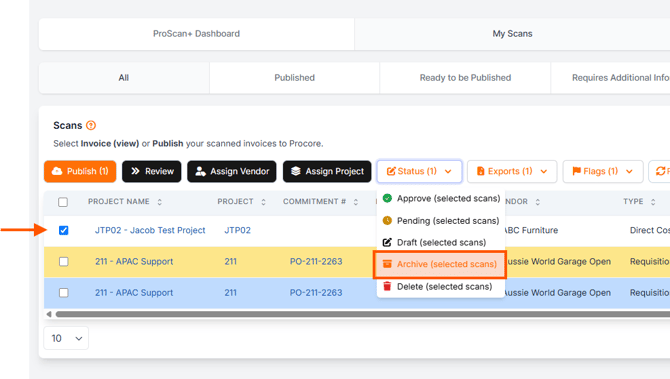
From My Scan
- Tick the selected invoice(s) in My Scans.
- Select the Status button
- Click Archive (selected scans)
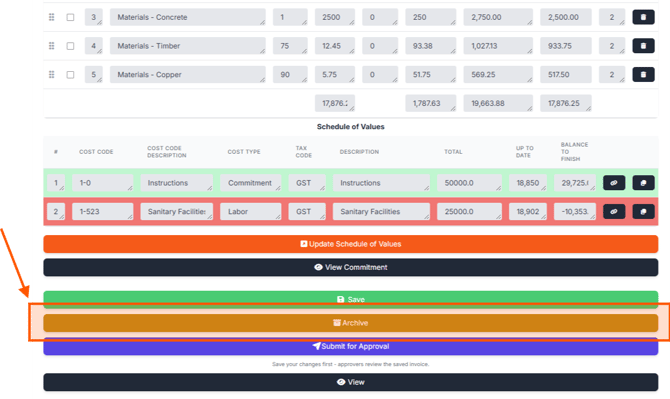
From Scan Page
- Open the selected scan
- Add Notes as required
- Click Archive (located at bottom of scan)